Beware of Black Friday Scams: How to Spot and Avoid Online Shopping Fraud in 2026

As shoppers hunt for unbeatable deals this Black Friday, cybercriminals are hunting for victims. Every year, millions of consumers fall for online shopping scams – and the trend is only growing. In 2024 alone, Americans lost an estimated $432 million to online shopping fraud, with a median loss of about $130 per incident. Globally, the cost of online shopping scams is projected to soar past $138 billion in 2026, a 20% jump from last year.
Below, we’ll explore how scammers operate during Black Friday, how to identify fake offers and websites, and which tools can help you shop securely.
Why Black Friday Is a Prime Target for Scammers
According to NordVPN’s Threat Protection Pro™ data, blocked attempts to access scam URLs skyrocket from October to January, peaking at more than 131 million hits in January. This spike coincides with Black Friday and holiday shopping, when consumers are rushing to secure the best deals and may overlook warning signs.
Cybercriminals exploit this urgency through fake websites, phishing emails, and counterfeit ads – all designed to steal personal and financial information.
Common Black Friday Scam Techniques
1. Fake Retail Websites
Fraudulent e-commerce sites mimic popular brands to trick buyers. While they often look convincing, you can spot fakes by:
- Checking the URL: Look for “HTTPS” and a padlock icon. Watch for misspellings or unusual characters.
- Inspecting quality: Scam sites often have poor grammar, broken links, or low-quality design.
- Researching the domain: Tools like Who.is can reveal a website’s age – many fake shops are created just weeks before Black Friday.
- Reading reviews: Verify the retailer’s reputation through independent sources or trusted social channels.
2. Phishing Emails and Messages
Phishing remains one of the most common Black Friday scams. Cybercriminals send fake shipping updates or “exclusive deal” emails that mimic Amazon, PayPal, or other brands. Clicking links or entering details on these fake pages can expose your passwords or credit card information.
Tip: Never click links in unsolicited emails or texts. Go directly to the retailer’s website instead.
3. Malicious Apps and Pop-Up Ads
Some fake shopping apps or pop-ups claim to offer exclusive deals but actually install malware that steals your data. Legitimate retailers rarely require you to download an app to shop.
Avoid: Apps or ads that ask for unnecessary permissions, download prompts, or redirect to unknown sites.
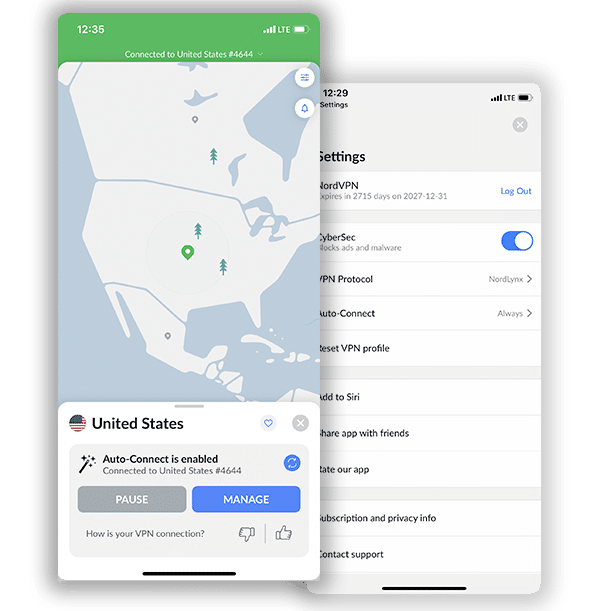
Get NordPass & Threat Protection + Secure VPN
How to Identify a Phishing Email
Phishing emails are one of the most common ways scammers target shoppers during Black Friday. They often appear to come from trusted retailers, delivery companies, or payment platforms – but their goal is always the same: to trick you into revealing sensitive data such as passwords, credit-card numbers, or account credentials.
Here’s how to recognize and avoid them:
1. Check the Sender’s Email Address
Look beyond the display name.
Scammers often impersonate well-known brands (like “Amazon Support”) but use suspicious domains such as amaz0n-help.com or [email protected].
If the domain looks unusual, misspelled, or doesn’t match the company’s official domain, delete it immediately.
2. Watch for Generic Greetings
Legitimate companies address you by name.
Phishing messages typically open with vague lines like “Dear Customer” or “Dear User” because the attacker doesn’t actually know who you are.
3. Examine the Message Tone
Urgency and fear are key tools for scammers.
If the email claims “Your account will be suspended in 24 hours!” or “Limited-time offer – click now!”, it’s likely a trap.
Reputable retailers never demand immediate action or threaten account closure without prior notice.
4. Hover Before You Click
Hovering over hyperlinks (without clicking) shows where they lead.
If the previewed URL looks different from the brand’s real website, includes random characters, or uses a shortened link (like bit.ly), it’s a red flag.
Always type the retailer’s address manually into your browser instead.
5. Check for Grammar and Design Errors
Many phishing emails contain awkward phrasing, typos, blurry logos, or poor formatting.
Official communications from major companies are almost always polished and consistent.
6. Look for Unexpected Attachments
No legitimate store will send invoices, shipping details, or discount vouchers as .zip, .exe, or .pdf attachments.
Never open files you weren’t expecting – they may contain malware designed to steal data.
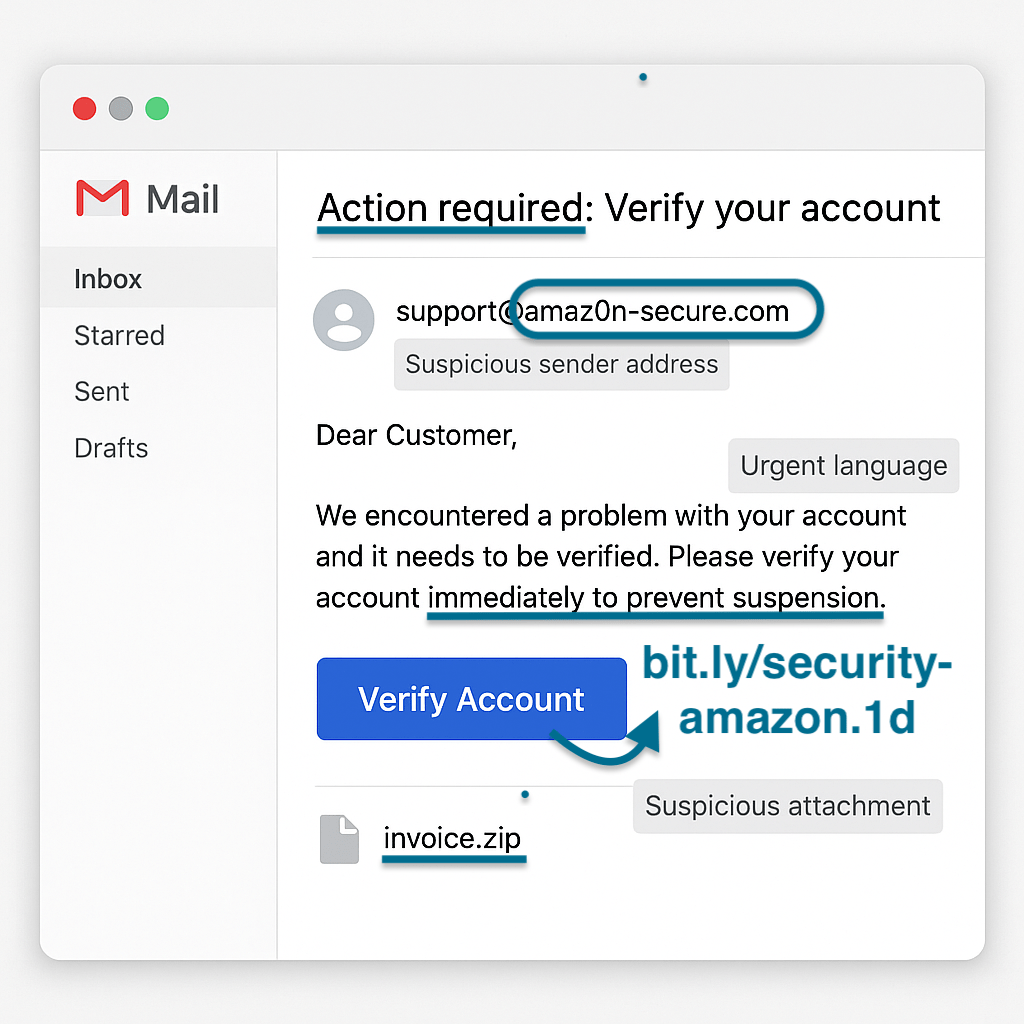
Example: Phishing Email
Notice the following red flags below:
- Suspicious Sender Address
- Red Flag: Fake or misspelled sender domains often imitate trusted companies.
- Example:
[email protected]– the domain replaces the “o” in Amazon with a zero (“0”), which is a classic spoofing tactic.
- Example:
- Red Flag: Fake or misspelled sender domains often imitate trusted companies.
- Urgent or Threatening Language
- Red Flag: Scammers create urgency to pressure victims into acting without thinking.
- Example: The subject line “Action required: Verify your account” and the phrase “Please verify your account immediately to prevent suspension” are designed to trigger panic.
- Generic Greeting
- Red Flag: Legitimate businesses address you by name, not with vague salutations.
- Example: The email starts with “Dear Customer” instead of your actual name — a common phishing sign.
- Suspicious Link
- Red Flag: Hyperlinks that appear legitimate but lead to unknown or unsafe URLs.
- Example: The “Verify Account” button likely redirects to a fake login page designed to steal credentials. By hovering over you can usually see the hyperlink without clicking, or you can right click and copy link address. We recommend pasting into a notes app or doc so you can check.
- Unsolicited Attachment
- Red Flag: Unexpected attachments — especially ZIP or executable files — can contain malware.
- Example: The attachment labeled “invoice.zip” is a classic example of a malicious payload used to infect your device.
7. Verify Through Official Channels
If you’re unsure whether an email is real, go directly to your account via the official website or app.
You can also contact the company’s verified customer-support number or chat feature to confirm whether the message is legitimate.
8. Use Security Tools for Extra Protection
Modern tools like NordVPN Threat Protection Pro or antivirus software can automatically detect and block phishing domains.
They analyze links, attachments, and sender information in real time – adding an automated safety net even when human vigilance slips.
🔐 Quick Recap: How to Identify Phishing Scams for Black Friday
| Red Flag | Example | What To Do |
|---|---|---|
| Misspelled sender domain | paypa1-security.com | Delete and report |
| Urgent call to action | “Click now to keep your account” | Ignore and verify directly |
| Suspicious link | bit.ly/sale-now-offer | Don’t click — visit manually |
| Attachments you didn’t request | “Your invoice.pdf” | Don’t open — scan first |
| Generic greeting | “Dear Customer” | Treat as suspicious |
Smart Tools to Stay Safe While Shopping Online
🛡️ NordVPN Threat Protection Pro
NordVPN’s Threat Protection Pro™ uses machine learning to detect and block unsafe websites by analyzing HTML structure, visual design, and URL metadata.
- It blocks malicious links, phishing pages, and fake online shops in real time.
- In independent tests, it blocked 90% of phishing attempts and 83% of harmful links, outperforming competitors.
- The system constantly updates itself to identify new scam tactics before they spread.
🔐 Use a Password Manager
Strong, unique passwords for each store reduce risk if one account is breached. Tools like NordPass securely store and autofill them.
💡Get Threat Protecton, Password Manager & Secure VPN – All-In-One!
When you subscribe to one of NordVPN’s higher-tier plans – Plus, Complete, or Prime – you don’t just get a powerful VPN. These plans include NordVPN Threat Protection Pro and NordPass, offering a complete digital security suite.
NordVPN Threat Protection Pro goes beyond basic VPN encryption by blocking malicious websites, phishing attempts, trackers, and intrusive ads. It also scans files for malware and even checks your Windows device for vulnerable apps that could pose a risk.
Meanwhile, NordPass serves as an advanced password manager that securely stores login details and payment information, ensuring you can shop faster and safer during peak shopping events like Black Friday.
Together, these tools provide multi-layered protection for your browsing, payments, and personal data – all bundled into NordVPN’s premium plans
Get NordPass & Threat Protection + Secure VPN
💳 Use Trusted Payment Methods
Choose credit cards, PayPal, or Google/Apple Pay – they provide legal protection and are easier to dispute in case of fraud.
🌐 Shop on Secure Networks
Always use a VPN on public Wi-Fi. It encrypts your data and prevents attackers from intercepting your login details.
What to Do If You Fall Victim to a Black Friday Scam
If you suspect you’ve been scammed, act fast:
- Contact Your Bank or Payment Provider: Cancel or freeze compromised cards and report fraudulent transactions immediately.
- Secure Your Accounts: Change all passwords, enable two-factor authentication, and run antivirus or malware scans.
- Report the Scam: Notify local authorities and the e-commerce platform (Amazon, eBay, etc.) to help prevent further fraud.
Final Thoughts: Stay Alert and Shop Smart
Black Friday should be about savings, not losses. With scams on the rise and billions at stake globally, being cautious online is more important than ever.
By double-checking URLs, using trusted payment methods, and employing security tools like NordVPN Threat Protection Pro, shoppers can enjoy incredible deals without risking their identity or finances.
Get NordPass & Threat Protection + Secure VPN
Frequently Asked Questions About Black Friday Scams
Be cautious of deals that seem too good to be true or come from unknown retailers. Check the website’s URL for spelling errors, verify that it starts with HTTPS, and look for clear contact information. Reading reviews from trusted sources can also reveal whether a store is legitimate.
The most common scams include fake retail websites, phishing emails pretending to be from known brands, malicious pop-up ads, and fraudulent apps. These scams aim to steal personal or financial data by impersonating trusted companies.
Immediately disconnect from the website, change your passwords, and run an antivirus scan. If you entered payment details, contact your bank to freeze your card and monitor for suspicious activity. Reporting the incident to the retailer and authorities helps prevent further scams.
Yes, if you take precautions. Always shop on official websites, use secure payment methods like PayPal or Apple Pay, and enable multi-factor authentication. Using a VPN and a password manager adds extra protection for your data.
A VPN encrypts your internet traffic, making it much harder for hackers to intercept personal or payment data – especially on public Wi-Fi. Tools like NordVPN Threat Protection Pro also block malicious links, fake websites, and phishing attempts in real time.
Related Posts
- Why You Should Use a VPN for Dating Apps and Sites: Privacy, Security & More
- The Risks of Finding Love Online
- How Much Do Game Developers Know About You?
- What is NordVPN’s SmartPlay – An In-Depth Look
- What Is a Digital Footprint?
- The Security Risks of Dining Out
- Which Governments Are Requesting Your Data The Most?
- How Many “Fake” Followers Do Instagram’s Top Celebrities And Brands Have?
- Fighting Unobvious Security Threats of the Remote Work
- The Real Truth About Privacy Policies — Debunking the Myths